 WYNZO.MICROSOFT STORE ↗
The route from file to DAC.
A practical guide to WASAPI output, bit-perfect playback and optional processing in Wynzo for Windows.
Updated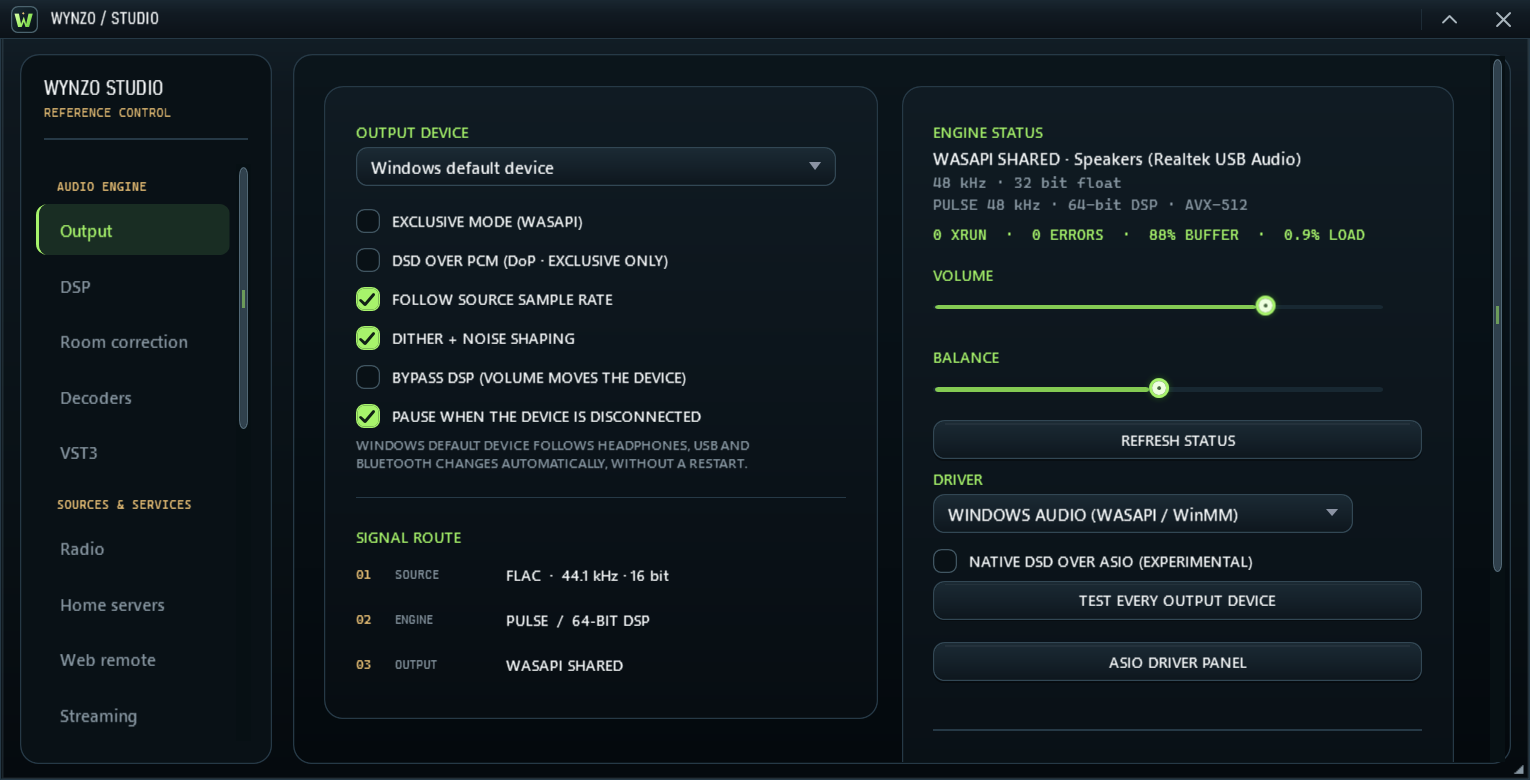
What the signal path means
Wynzo is a native Windows music player with the PULSE audio engine. Studio exposes the decoder, processing state, negotiated output format and device route. That makes it possible to distinguish an unchanged digital path from one that intentionally applies EQ, resampling or other processing.
The route begins with a local file, continues through decoding and optional processing, and ends at the selected Windows audio device. A DAC then performs digital-to-analog conversion outside the player.
WASAPI shared and exclusive output
| Output path | What it does | What to check |
|---|---|---|
| WASAPI shared | Uses the Windows shared audio path, alongside other applications. | The Windows mix format, system effects and speaker configuration can influence the result. |
| WASAPI exclusive | Requests a device format directly through Windows exclusive audio. | The device and driver must accept the requested rate, channel layout and sample format. |
| ASIO | Uses an installed ASIO driver when available. | Driver behavior is device-specific. The documented hardware checks do not establish universal ASIO compatibility. |
Exclusive mode alone does not make every route bit-perfect. Processing, volume changes and format conversion still matter. If a requested path is unavailable, inspect Studio to see the route actually in use.
Setting up a bit-perfect path
Bit-perfect playback means the digital samples delivered by the selected path match the source samples. It is a technical property of that path, rather than a guarantee of better sound on every system.
- Choose a local lossless file with a format your device supports.
- Enable bypass so optional DSP is out of the path.
- Use compatible exclusive output and confirm the negotiated sample rate and format in Studio.
- Avoid sample-changing processing such as EQ, normalization, crossfeed or upsampling.
- Inspect the available verification result rather than assuming a device setting proves the entire route.
A FLAC file can carry an MD5 checksum of its original decoded samples. Wynzo can use it for verification when present. That check does not measure the analog output of a DAC, prove audible superiority, or apply to a file without a usable embedded checksum.
Wynzo's current bypass path includes precision handling for supported 32-bit sources and compatible 32-bit exclusive or ASIO output. The actual source, selected route and accepted device format remain the deciding factors.
Parametric EQ, room correction and upsampling
Up to 24 parametric EQ bands can work on both channels, an individual channel, Mid or Side. The editor supports filter import and optional linear-phase processing. Room correction uses an intentional change to the signal to address the response of a listening system.
PULSE ULTRA is optional upsampling at exact multiples of the source rate, up to ×16 and 768 kHz when the output device supports the chosen format. It is processing, so it belongs to a different route from unchanged playback. A higher output sample rate is not, by itself, evidence of an audible improvement.
Studio shows which processing is enabled. Choose an unchanged path for source preservation, or a processed path for a specific correction or listening preference.
Lossless files, DSD and surround
Wynzo's current decoder documentation covers FLAC, WAVE, AIFF, WavPack, Monkey's Audio and TTA, alongside common compressed formats. DSD playback includes DSF and DSDIFF, with SACD image support in the current application.
DSD can use PULSE's DSD-to-PCM conversion, or a compatible bitstream path. DoP requires a device that accepts the format. Native DSD over ASIO remains experimental in the documented hardware verification and is off by default; it should not be treated as proven on every DAC.
Supported 5.1 and 7.1 files can keep their channels discrete when the device accepts the layout. Shared mode follows the Windows speaker configuration. A stereo output cannot reproduce a discrete multichannel layout without a conversion or a different device.
Choose the route, then listen
Start with your files, your device and a clear goal. Use the homepage's signal path study to explore the stages, then inspect the actual settings in Wynzo Studio.
View Wynzo in Microsoft Store for installation, pricing, availability and current requirements. For interface customization, see the Winamp skin guide.